Google brings its Gemini chatbot app directly to Apple CarPlay
Drivers can now talk hands-free to Google's AI assistant while driving, without needing to open Google Maps first.
How it works
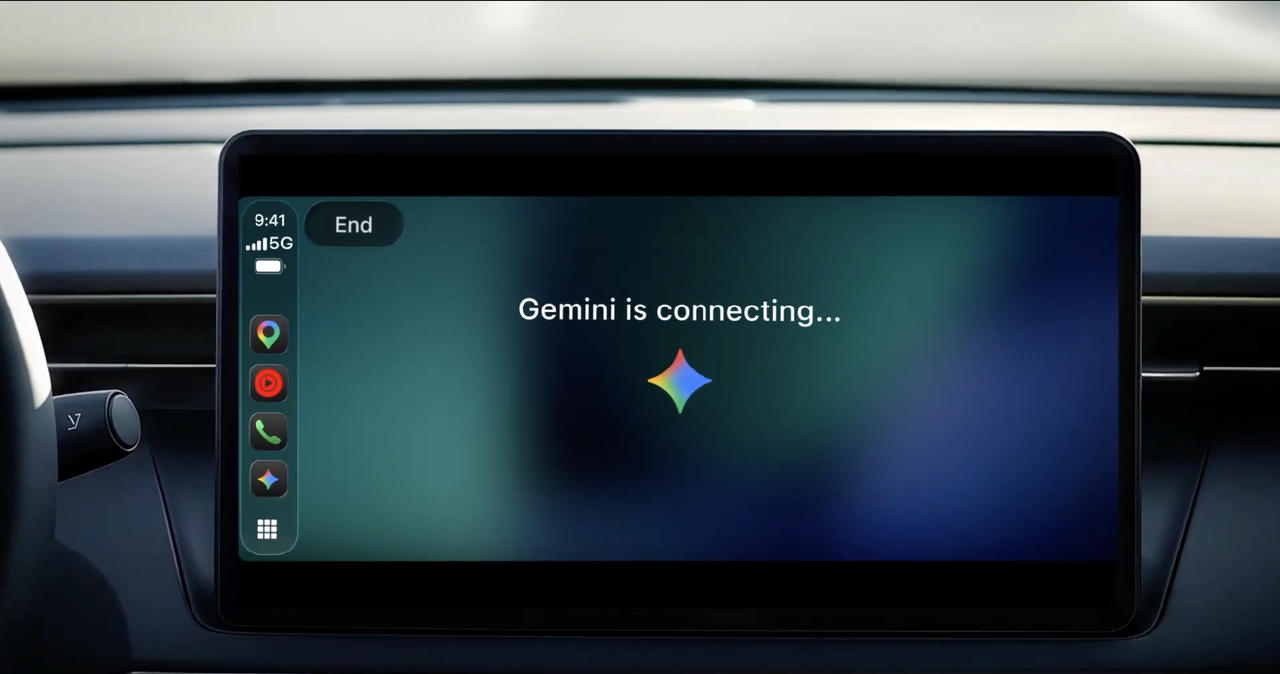
A Google chatbot app now available on Apple CarPlay screens so drivers can talk hands-free instead of touching their phone.
- Update the Gemini app from your iPhone App Store
- Allow the app to use your microphone in settings
- Connect your iPhone to the car via CarPlay
- Tap the Gemini icon on your dashboard screen
What you could do with it
- A daily commuter could summarize their inbox and check their calendar hands-free during the drive, turning an hour of travel into productive time 2.
- A driver could practice a presentation out loud before an important meeting, getting real-time feedback without taking their eyes off the road 1.
- Someone behind the wheel could hear their Daily Briefing and get suggestions for nearby places while heading to a destination, all without touching their phone 1.
A direct tap to talk to Gemini
Until today, people using Apple CarPlay could only reach Gemini through the Google Maps app. Now there is a separate Gemini icon on the car display, so starting a conversation is one tap away 1. The feature launched globally on November 11, 2026 2.
You do need to meet a few conditions before it works in your car. Your iPhone must have the latest version of the Gemini app installed, microphone permissions must be turned on, and you must have used Gemini Live at least once on the phone itself 1. Once those steps are done, the two stay linked: whatever you discuss in the car syncs to your iPhone chat history, so you can pick up where you left off after you park .
What you can actually do behind the wheel
Gemini speaks and listens in every language that Gemini Live supports on CarPlay 1. Google says the tool is meant for safe, hands-free use while driving 2. Typical uses include reviewing your calendar, summarizing your inbox, practicing a presentation out loud, hearing your Daily Briefing, or getting suggestions for places near your destination .
The company described the goal simply: turn the quiet hours of a daily commute into productive time without taking your eyes off the road 2. For millions of drivers whose round trip averages about an hour, that is a practical reason to care .
Google is everywhere on wheels
This CarPlay launch follows other recent moves to put Gemini inside vehicles. Google recently enabled a Personal Assistance mode on Android Auto, which lets the chatbot pull details from other Google apps so replies feel more personal 1. It is also adding Personal Intelligence to Gemini in cars that have Google built in at the factory . Together, these steps show a clear pattern: Google is trying to make its AI assistant impossible to miss, whether you sit in front of a desktop, hold a phone, speak to a speaker, or drive a car .
How to get it working
Open the App Store on your iPhone and update the Gemini app if an update is waiting. Go into your phone settings and make sure the Gemini app has permission to use the microphone. Launch Gemini Live at least once on the phone so the CarPlay version unlocks 1. Then connect your iPhone to your car and tap the Gemini icon that should now appear on the dashboard screen .
If the icon does not show up immediately, double-check that your phone and car software are both on their latest versions, then restart the connection between them 1.
This story reports on a trend for information only. It is not advice or encouragement to do any of it.
Corrections and updates
- Corrected on 11 November 2026. An earlier version said Google is simultaneously expanding Gemini on Android Auto and cars with Google built-in; the source says Google brought Gemini to CarPlay 'not long after' enabling features on Android Auto, indicating a sequence rather than simultaneity.
Key facts
- Google Gemini app is now directly available on Apple CarPlay, launched November 11, 2026
- Previous access required going through Google Maps; now there is a dedicated Gemini icon on the dashboard
- All conversations sync with the Gemini iPhone app and remain in chat history
- Users need the latest Gemini app version, microphone permissions enabled, and at least one prior Gemini Live session on iPhone
- - Google is expanding Gemini on Android Auto and cars with Google built-in
Sources
Keep reading
 How it worksGoogle's Rambler AI dictation now comes to Pixel 10 phonesHerald of AIHow it works
Google's Rambler AI dictation now comes to Pixel 10 phones
Google's voice-to-text feature that turns your rambling speech into clean, correct writing is rolling out to older Pixel 10 devices.


Related stories
 New modelsByteDance says its new Seedream 5.5 model can edit one image 100 times without breaking itHerald of AI
ByteDance says its new Seedream 5.5 model can edit one image 100 times without breaking it
A new AI image tool that lets designers keep making changes over and over — useful for anyone who has ever lost quality after a few edits.
 New modelsHow to turn off Google Health's Gemini -powered AI CoachHerald of AI
How to turn off Google Health's Gemini -powered AI Coach
Users who find the AI health assistant too pushy or intrusive can hide it without losing their premium subscription.
 The weekThis Week in AI Vulnerability, Tools, and BubblesHerald of AI
This Week in AI Vulnerability, Tools, and Bubbles
Chatbots cracked under kindness, stock fears grew, and open-source alternatives kept popping up.
New modelsGoogle turns off Gemini for K-12 students unless schools choose to switch it onHerald of AI
Google turns off Gemini for K-12 students unless schools choose to switch it on
Schools now have to opt in before their students can use Google's AI tools, after the company offered them to everyone by default.