Claude lets you turn AI-built tools into desktop apps for Mac and Windows
You can now save your favourite Claude creations as standalone programs that open in their own windows, send notifications, and even control your files—no coding or installation hassle.
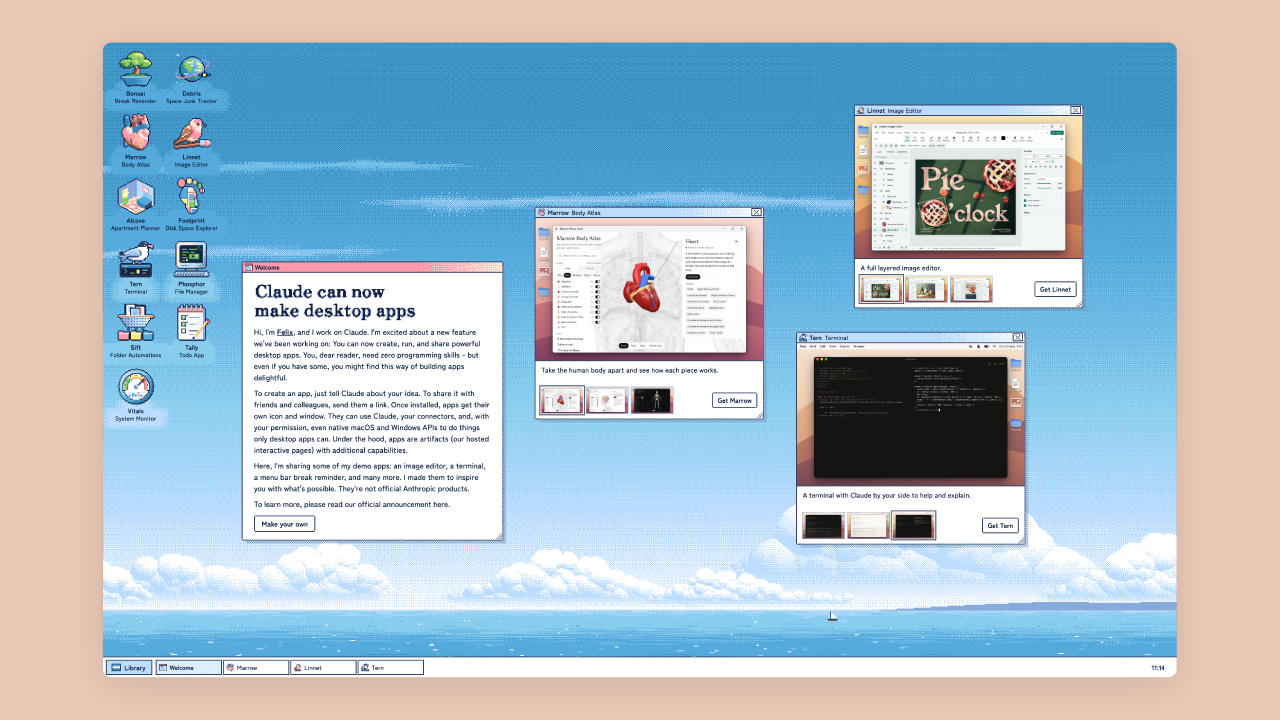
An AI assistant that now lets you turn web-based tools into installable desktop programs for Mac and Windows.
- Build a useful tool inside Claude
- Click Share and choose Install as app
- Open the app in its own window
- Edit the original and updates follow
What you could do with it
- A knowledge worker could build a meeting-preparation page inside Claude that pulls in calendar and email details, then install it as a desktop app that runs on its own and reminds them when something needs attention 1.
- An operations manager could create a daily order-tracking tool and install it as a standalone app so they get menu-bar notifications instead of checking the browser every time 1.
- A computer user could organise their files by turning a Claude-built folder-organiser artifact into a desktop app that monitors and sorts folders without needing to package, sign, or configure anything 2.
Picture: claude.com
From the official announcement
How the feature works
When you create something useful in Claude—a meeting-prep page that pulls from your calendar, a daily order tracker, a folder-organiser—you can click Share and choose Install as app. The artifact then gets its own desktop icon and opens in a separate window, no longer inside the Claude interface 1.
The app stays linked to Claude: every time you edit the original artifact, the installed copy updates automatically. It can still call on Claude and any connectors you’ve allowed, but each request counts toward your subscription’s usage limits 1. There is no need to package, sign, or configure an API key—everything uses your existing Claude account 2.
Three levels of permission
To keep you safe, each installed app asks for one of three permission tiers:
- Default: The app can only do what it could already do inside a browser.
- App permissions: You can let the app send notifications, add items to your menu bar or system tray, float over other windows, or listen for global keyboard shortcuts 12.
- Full computer access: Once granted, the application can execute software and modify, view, or remove your documents on its own, rather than seeking permission every single time. You can grant this level only to apps you built yourself—or, on Team and Enterprise plans, to apps made by people inside your organisation 12.
Every permission covers just one version of the app, so Claude will ask again after every update, even if you edited the app yourself. If part of the app loads code from another website, that piece can change without prompting you again 2.
Where you can—and can’t—use it
The “Install as app” feature rolls out in beta today on Claude for Mac and Claude for Windows, on every plan 12. You must be online and signed in to open an installed app. It is not available on Linux, the web, or mobile devices . Organisations that require HIPAA-ready setups or hybrid deployments cannot use the feature .
On Team plans the feature is turned on by default, with full computer access switched off. On Enterprise plans it stays off until an owner enables it, and admins can restrict which permissions users may grant 1. You cannot install artifacts built from templates like Claude Docs, Slides, or Sheets 2.
What people have already built
Anthropic’s own staff have used the new capability to create several demo apps: Linnet, a layered image editor; Phosphor, a film-set-style file manager; Sift, a folder organiser that runs rules; Tern, a terminal with Claude beside it; and Vitals, a menu-bar performance monitor 1. Users can see more examples from one of the company’s engineers .
The move follows other recent releases from Anthropic, including a way for MCP servers to ship skills inside Claude and a “Siren” test that checks whether Claude escapes weakened sandboxes 2. Those safety measures do not apply to the newly installed apps .
This story reports on a trend for information only. It is not advice or encouragement to do any of it.
Corrections and updates
- Corrected on 25 November 2026. An earlier version said you could convert any Claude artifact into a desktop app; however, the source states that some artifacts—such as Claude Docs, Slides, and Sheets—cannot be installed, so only most artifacts are convertible.
Key facts
- - Beta feature lets you convert most Claude artifacts into a Mac or Windows desktop app.
- Installed apps get their own icon, open in a separate window, and update automatically when the source artifact changes.
- Three permission tiers—default, app‑permissions, full computer access—with the highest only allowed for apps you created yourself.
- Usage through the installed app counts against your Claude plan limits.
- Feature is unavailable on Linux, web, mobile, or for HIPAA‑ready organisations.
Sources
- Turn artifacts into Mac and Windows apps
- Claude can now install artifacts as Mac and Windows desktop apps — thenextweb.com
Watch
If this story concerns you or your company, or uses something that belongs to you, ask for a correction or for it to be taken down. How requests work
Keep reading
 Apps and productsJ.Crew launches an AI stylist powered by Anthropic's Claude modelsHerald of AI
J.Crew launches an AI stylist powered by Anthropic's Claude models
Shoppers in the US can now describe an occasion and get a full outfit from J.Crew — all using Claude instead of hunting for each piece one by one.
 The weekThis Week in AI New Models Flood In and Agents Get SaferHerald of AI
This Week in AI New Models Flood In and Agents Get Safer
Big open-weight releases, speed breakthroughs, and a push to make AI agents more reliable and secure.
 How it worksAI proves Riemann Hypothesis, but humans can't read the proofHerald of AI
AI proves Riemann Hypothesis, but humans can't read the proof
Anthropic's Claude helped solve one of math's biggest problems, but the answer is now locked away in millions of lines of machine-checkable code.