A new painting app lets your AI coding agent draw while you edit every stroke
Klad gives a coding agent real brushes so it paints directly on your canvas — then you can tweak anything by hand without starting over.
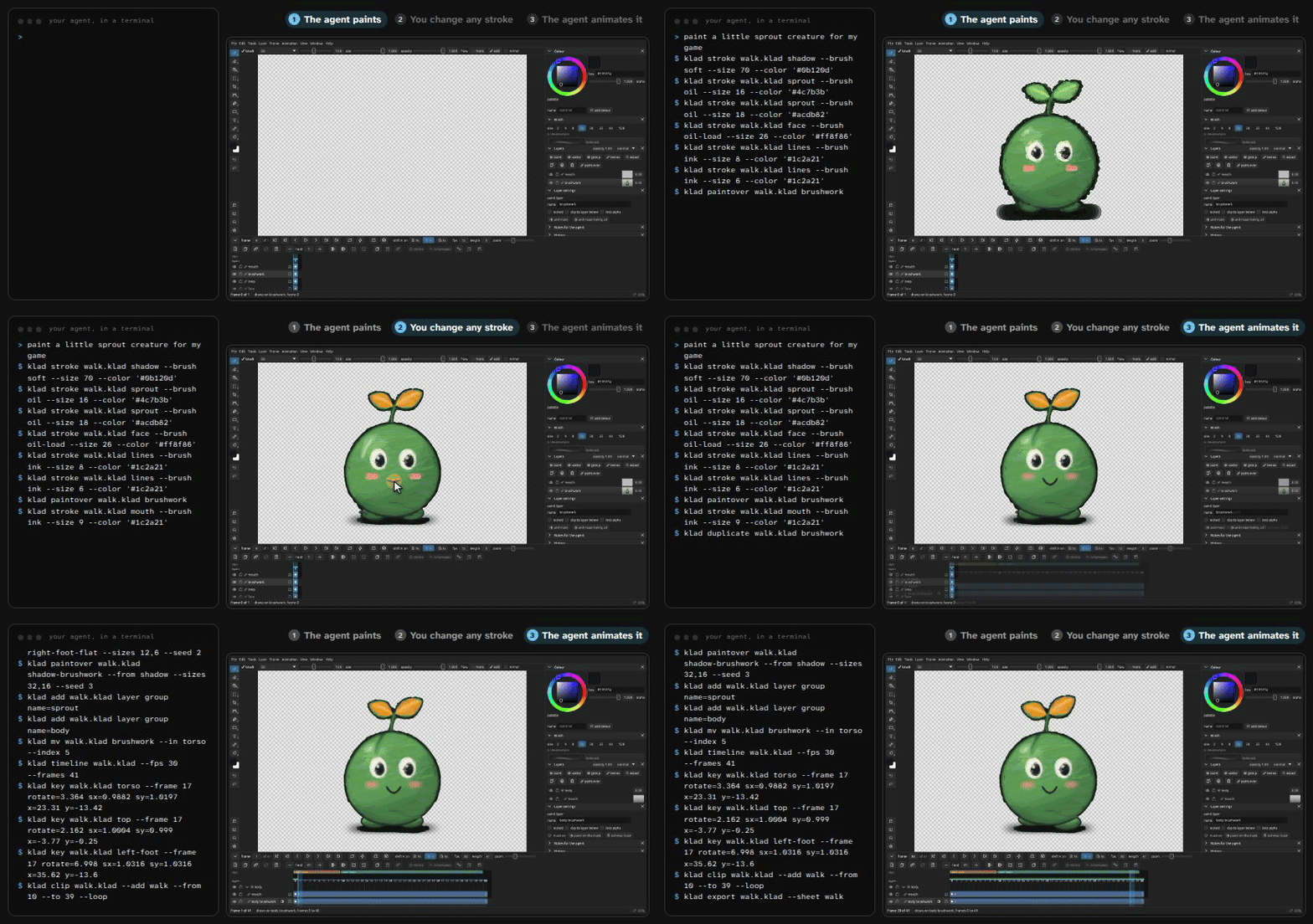
How it works
A drawing app where an AI agent paints brushstrokes on your canvas that you can edit by hand.
- Ask a coding agent a drawing request via command line
- The agent paints strokes directly on your canvas
- You pick and change any stroke, colour, or smudge by hand
A developer called klad-app is sharing the first public version of Klad, described as "early" software you build yourself from the GitHub code 12. It runs today on Mac with pen pressure support, and builds on Linux and Windows too — though only mouse drawing works on Linux so far and nobody has drawn on Windows yet .
What you could do with it
- A game developer could have a coding agent like Claude Code or Codex paint game assets such as characters, props, and backgrounds through Klad's command line, then hand-edit any individual stroke without redrawing from scratch 1.
- An animator could generate in-between frames from key poses using the timeline and onion-skinning tools, then export directly as PNGs, sprite sheets, or into the Godot engine 2.
- A studio under 500,000 euros in annual revenue could store its drawings as plain files on the computer that edit only what they change, letting them live well in git 1.
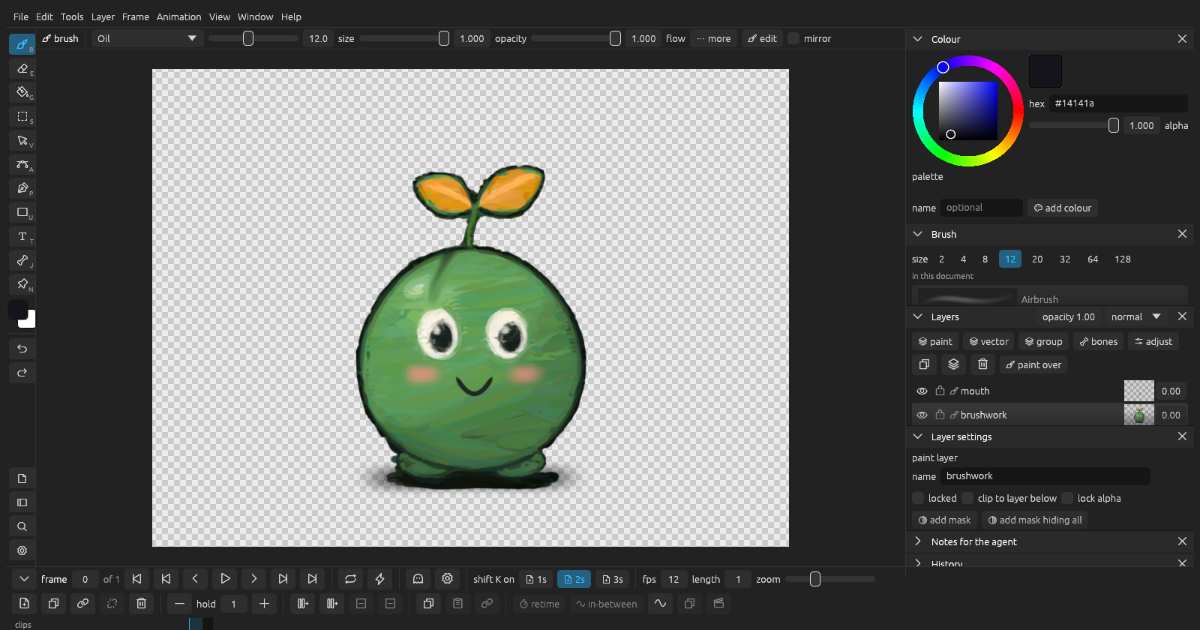
Picture: klad.studio
An exampleInvented to explain it
Maya, building a pixel-art indie game
MayaMake me a small sprout creature for my game
Klad agentHere is a sprout, 4,344 strokes from Claude Fable 5.2
MayaCan I bend its leaf?
Klad agentYes, every mark is editable individually in the editor
Maya coloured a leaf and saved it as part of her game assets.
How it works
When you ask your agent something like "a little sprout creature for my game," the agent paints through Klad's command line. It produced a test creature made of 4,344 individual strokes and fills using Claude Fable 5.2. You then pick any leaf, smudge or color and change it by hand — bend the mouth, recolour the leaves, blend a blush 1. The agent's strokes appear in your editor about a second later, marked as its own, sitting in a shared history you can undo one step at a time 2.
An animation pass put the creature into five groups with 205 key frames, and no frame was painted again from scratch 1. The project also demonstrates full scenes and prop kits made this way, replayed stroke by stroke on the site 2.
Why not just generate the picture?
Image generators hand you pixels, and the only thing left to do is reroll and hope 12. Klad keeps every stroke as data — where it went, how hard the pen pressed, which brush and colour . It is not flat vector art either: loaded oil paint leaves ridges, smudges drag paint already on the layer, and moving a smudge later makes Klad blend it again wherever it lands . Vectors are still available for shapes, gradients, glows and fifty open fonts when you need posters or covers .
The drawing lives as a folder of plain files on your computer. There is no account required, it checks for a new version once a day unless you turn that off, and each edit changes only the relevant files so drawings fit easily into version control like git 1.
What you get in the app
Klad comes bundled with twenty-three brushes, a brush editor, plus features like layers, masks, clipping, and effects. It also includes a timeline with onion skinning, generates in-between frames from key drawings, supports bones with inverse kinematics, and allows exporting as PNGs, sprite sheets, or directly into the Godot game engine 12. A pair of MIT-licensed skill files teach any agent how to look at a drawing, make edits and check results, plus the craft side — planning pictures, light on form, edges, colour and materials . The format spec itself is published under the MIT licence so other apps can read and write Klad files .
Price and availability
Klad is source-available rather than fully open source. It is free to build and use for yourself, and free inside a company earning less than 500,000 euros a year in revenue, similar to the model used by Aseprite 12. The first build is early; a double-click installer is available via a waitlist on the site . You clone from GitHub to start .
This story reports on a trend for information only. It is not advice or encouragement to do any of it.
Key facts
- Agent painted a 4,344-stroke creature demo using Claude Fable 5.2
- Free for personal use and companies under 500,000 euros yearly revenue
- Runs natively on macOS with pen pressure; Linux build exists (mouse-only) but Windows build reportedly passes tests with no one having drawn on it yet
- No account needed; drawings are plain files on disk suitable for git
- First public 'early' version available to build from source on GitHub
Sources
Keep reading
 PeopleNew AI models Claude Fable 5.2 and Mythos 5.2 are now easier to use on the command lineHerald of AIPeople
New AI models Claude Fable 5.2 and Mythos 5.2 are now easier to use on the command line
Claude Fable 5.2 is faster and cheaper than before. A small tool update lets anyone type prompts directly instead of clicking around a website.
New modelsAnthropic upgrades Claude Fable and Mythos to version 5.2 with faster speeds and lower pricesHerald of AI How it worksUber, DoorDash, and Airbnb say barely anyone uses AI agents yetHerald of AI
 How it worksMicrosoft finds 'Lazarus' backdoor that turns AI agents against you using tiny neuron changesHerald of AI