Yogurt lets you record and summarize meetings with AI that runs entirely on your own computer
A free open-source app turns your calls into transcripts and summaries without sending any data to the cloud.
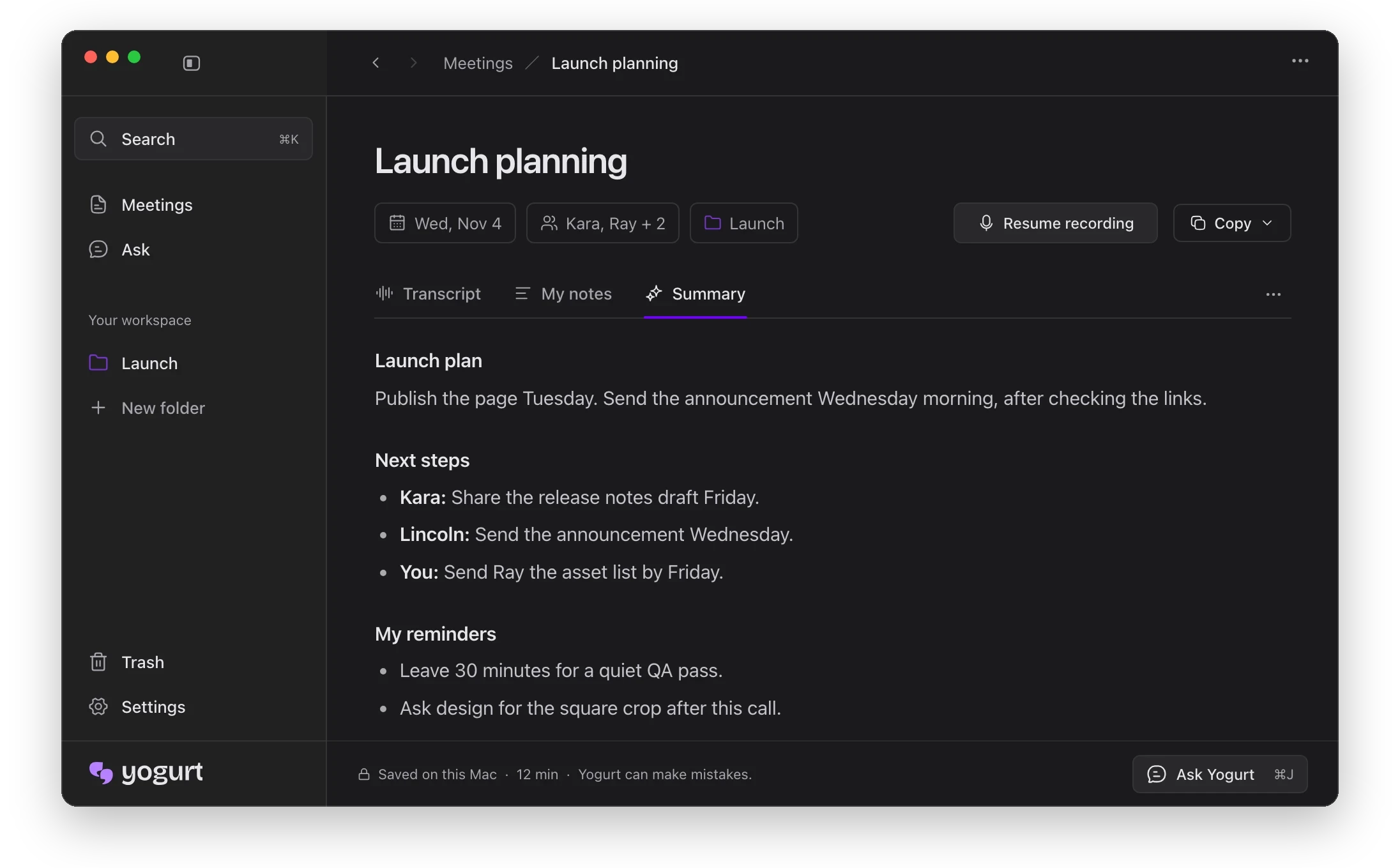
A free desktop program that records your online calls and creates transcripts and summaries using AI on your own computer.
- Start a call in Zoom, Teams, or Meet.
- Let the app record and take down every word.
- AI reads the transcript and writes up notes.
- Ask questions and get answers tied to the call.
What you could do with it
- A remote worker could record their Zoom, Teams, or Google Meet calls without adding a bot, then get live transcripts and summaries that stay entirely on their own computer 1.
- A researcher could ask questions across many past meetings and receive answers linked back to the original source material, all processed offline after one model download 1.
- A team lead could store meeting notes in organized folders, search them by title or content, and export them as Markdown files for easy sharing or integration with other tools 1.
Picture: github.com
How it works
Yogurt listens to your microphone and the sound coming from your computer, so it can capture calls in Zoom, Microsoft Teams and Google Meet without joining as a bot 12. When it detects a supported call start — by watching which apps use the microphone and, for browser calls, checking the tab title or a nearby calendar event — it offers to begin recording . You choose whether to go ahead .
Live words appear on supported Macs thanks to Apple's SpeechAnalyzer, while the saved transcript is produced by Whisper, an open speech-recognition tool, through a project called whisper.cpp 1. On slower machines Whisper falls back to a smaller model . Transcription covers 99 languages when you select Multi-language in Settings . Speaker names are pulled from Zoom, Teams and Meet on Mac only, after you grant Accessibility permission .
After the call, a local open-weight AI model — chosen from the Gemma 4, gpt-oss or Qwen3 families and run through llama.cpp — produces summaries and answers questions across your meetings, linking each answer back to the source material 1. Everything happens offline once the models are downloaded .
Yogurt keeps your meetings private by running everything on your own computer
- Zoom / Teams / Meetcaptures call audio from any supported app
- Whisper + SpeechAnalyzertranscribes speech directly on your machine
- Gemma 4 · gpt-oss · Qwen3generates summaries using a model you download once
- Your hard drivestores recordings, transcripts, and notes locally
- MCP serverlets another assistant app read your notes on demand
All details drawn from the Yogurt announcement on GitHub
What you get and where it lives
Your recordings, transcripts, notes and settings are stored on your own hard drive 1. Mac keeps them in ~/Library/Application Support/Yogurt, Windows in %APPDATA%\Yogurt and Linux in ~/.config/Yogurt or $XDG_CONFIG_HOME/Yogurt if that variable is set . Meetings can be filed into folders, searched by title, notes or transcript, and copied or saved as Markdown files .
If you want another assistant app to read your notes, Yogurt includes a local MCP server 1. Access is off by default; you turn it on in Settings → AI apps, copy the helper command and add it inside your assistant app . The connected app gets read-only access to meetings, notes and transcripts . Mac and Linux lock the socket to your user account with 0600 permissions, while Windows uses a named pipe with a fresh random name at every launch, kept in your profile folder . Because there isn't a separate login credential for every individual program, any software tied to your account has the ability to view information anytime permissions remain turned on. Settings shows whatever name the assistant reports .
Getting started
Yogurt needs at least 8 GB of memory and runs on macOS 14.4+ with Apple Silicon, Windows 10 version 2004 or newer (x64), or Ubuntu 22.04+ and similar distributions 1. If your machine is too slow, the app tells you during setup . A Windows warning that the publisher is unknown simply means the app lacks a Microsoft code-signing certificate; clicking "More info" then "Run anyway" lets you proceed, and because the software is open source anyone can check what it does .
During the first run Yogurt downloads a small notes model of about 5 GB, then adds a larger model up to 14 GB or more depending on your hardware 1. Recording begins after setup completes; notes and questions work offline as soon as the notes model is in place . The whole thing is free under an MIT license — no account is needed — and the source code is available on GitHub .
Key facts
- Yogurt is free, open-source software made by Frigade under the MIT license.
- - All transcription and summarization run locally using Whisper, Apple SpeechAnalyzer and Gemma 4/gpt-oss/Qwen3 open-weight models via llama.cpp.
- It records microphone and system audio without joining meetings as a bot, and supports Zoom, Teams and Meet call detection.
- After a one-time download of roughly 5 GB to 14 GB+, summaries and questions work completely offline.
- Meeting data stays on the user's device; an opt-in local MCP server gives assistant apps read-only access.
Sources
If this story concerns you or your company, or uses something that belongs to you, ask for a correction or for it to be taken down. How requests work
Keep reading
Apple UK iPhone users miss boosted Siri AI access with iCloud +
Britain is excluded from the free upgrade that lets most iCloud+ subscribers use heavier Siri AI tasks more often.
 Apps and productsApple launches a free app so people can test and shape AI health tools before they reach everyoneHerald of AI
Apple launches a free app so people can test and shape AI health tools before they reach everyone
A new Apple study lets anyone with a recent iPhone chat with an AI health assistant and rate its answers — helping Apple build better tools for real people.
Older Apple TV 4K gets Siri AI in free tvOS update
Apple is bringing its smarter Siri features to 2nd- and 3rd-generation Apple TV 4K boxes in an upcoming software update — no new hardware needed.